
ZIP is a popular format for sending multiple files over the network. You download a very important ZIP archive from the internet and then find that the ZIP file is either corrupt or damaged due to an incomplete download or any other reason. But there is a way to repair or fix the damaged archive without redownloading.
Showing posts with label WindowsOS. Show all posts
Showing posts with label WindowsOS. Show all posts
07 April, 2025
28 May, 2021
by
Updated on
28 May, 2021
9 comments
Best Free Software For Windows 10 [Update 12]
Windows 10 is a great OS. The curated list of software you must have on your computer. Most of the software doesn't need any introduction.
The download links are original authors websites. Bookmark this page to keep the list handy. All the software included are completely free.
The download links are original authors websites. Bookmark this page to keep the list handy. All the software included are completely free.
07 August, 2020
by
Updated on
07 August, 2020
Leave a Comment
How To Completely Remove Malwarebytes
Malwarebytes is good. I use the free version to occasionally scan my PC. The Windows Defender is with common sense is fine for basic security. But then the Malwarebytes free version is must for a weekly scan. It was fine till last month but suddenly the new version I installed was not easy to uninstall.
The uninstallation from control panel left everything as it is and removed the entry from the program list. I deleted the complete folder from C drive program files still the Malwarebytes was working fine. Tried many other ways to completely remove the installation but no way.
The uninstallation from control panel left everything as it is and removed the entry from the program list. I deleted the complete folder from C drive program files still the Malwarebytes was working fine. Tried many other ways to completely remove the installation but no way.
29 May, 2020
by
Updated on
29 May, 2020
Leave a Comment
5 Best Spelling and Grammar Checking Tools For Error Free Writing
Digitization has completely eroded the writing on paper and so the grammar. Or I would say grammatically correct writing skills. Most of the people who use any writing software, just type anything without attention to the spelling and then hit the spell-check.
Office suites like Microsoft Office, Open Office, Google Docs also provide grammar checking facilities making everyone lazy and downgrading the importance of vocabulary and grammatical skills. But do you think all this software' are really working correctly?
19 May, 2020
by
Updated on
19 May, 2020
Leave a Comment
Pin Any Program As Always-On-Top
If you work on two or more programs at a time and switch between different programs for the reference, you may want to pin one window on top of the other.
Pinning a program window on top of all other windows may help you to work in multiple software at a time in Windows OS.
Here are 3 tiny Windows utilities that can pin any program window at the top of another window or everything else open on your desktop.
17 May, 2020
by
Updated on
17 May, 2020
Leave a Comment
Exhaustive List Of Useful Kindle Tools & Services
Coming straight to the point without any description. Here is the list of useful tools with a short description and where you can download or how to use them.
If you have an Amazon Kindle, I suggest you to check out to get more out of the cute Kindle.
by
Updated on
Leave a Comment
Show Network Speed On TaskBar In Windows 10
You can add network speed, CPU usage stats, system temperatures, and other useful information to your Windows OS taskbar. A small tool to display multiple stats on the taskbar which can be customized as you want.
All the software listed here is free to use and add very handy and useful information to your Windows taskbar.
15 May, 2020
by
Updated on
15 May, 2020
Leave a Comment
Create Cute XMarks Calendar To Track Habit & Stay Motivated
Create or bread a habit if you follow it for 21 days. Creating a 7x7 calendar and X marking the grid helps you keep motivated.
There are many habits tracking mobile apps, still, the X marks are the best thing to stay motivated. XMarks calendar is the best way to build and track your daily habit. You can create a simple Xmark calendar to track your habits and here are very useful and customizable calendar creation tools for you. The XMarks calendar may prove to be the best motivation for developing a good habit and keeping it up forever.
06 September, 2019
by
Updated on
06 September, 2019
14 comments
How To Backup And Restore Windows Drivers Without Any Software
You can back up all the device drivers installed on your current working system configuration without any software and also restore them if you format the operating system for any reason.
01 September, 2019
by
Updated on
01 September, 2019
Leave a Comment
Install Windows 10 On BIOS & UEFI Motherboards
To install a new operating system for your PC, you have to create a bootable media which is obviously a USB pen drive.
10 August, 2019
by
Updated on
10 August, 2019
Leave a Comment
Limit Maximum Volume In Windows With Sound Lock
While watching a movie, you might have observed the sudden increase in volume and you have to manually reduce the volume. This is more problematic when you are watching videos at night and other family members are sleeping. The more annoyance is when the sound volume goes back to a low level because the volume is too much only during some high action scenes.
You can normalize the sound and set the maximum limit of the volume for all the applications running across the Windows OS.
You can normalize the sound and set the maximum limit of the volume for all the applications running across the Windows OS.
30 July, 2019
by
Updated on
30 July, 2019
Leave a Comment
How To Block A Specific Website On Windows Without Any Software
I know, you want to be productive and don't want to waste your time on browsing Facebook, Twitter or Reddit. But you don't know, how you go there and you waste hours on those social media sites.
Self-control is the only way to use your time for productivity. If you don't want your kids and other family members to open a few specific websites, that is also possible by editing the Windows Host file.
Self-control is the only way to use your time for productivity. If you don't want your kids and other family members to open a few specific websites, that is also possible by editing the Windows Host file.
12 January, 2019
by
Updated on
12 January, 2019
15 comments
How To Repair Corrupt USB Flash Drive
Is your USB drive broken? The USB flash drive repair tool can help you to recover your damaged or corrupt USB pen drive. The USB flash drive may damage while you are trying to install a new operating system. While creating many partitions or due to some virus that corrupts the entire USB drive.
You can use the same tool for SD Cards and other portable storage devices.
I was trying out the Google Chromium OS. After the test, I tried to format my USB flash drive. But the USB drive was completely destroyed and had only 1 GB usable space.
The other 3 GB space was not accessible. When opened the Windows Disk management tool, there were 8 partitions. Out of 8, only one partition was usable by Windows. All other partitions were of no use.
The other 3 GB space was not accessible. When opened the Windows Disk management tool, there were 8 partitions. Out of 8, only one partition was usable by Windows. All other partitions were of no use.
19 December, 2018
by
Updated on
19 December, 2018
Leave a Comment
Everything You Need To Know About Windows Drivers
Windows Drivers are the core part of the Windows OS. They work in the background but are very important to keep your system running smooth and without the crash.
There is much software that claims to auto-update all your Windows Drivers but most of the Drivers Update tools are fake or do not do what they claim to do. So it is very important not to rely on any of the Windows Driver Auto Update utilities out there. You should always use the Windows built-in procedure to update or download the driver pack for Windows 10 or even Windows 7.
There is much software that claims to auto-update all your Windows Drivers but most of the Drivers Update tools are fake or do not do what they claim to do. So it is very important not to rely on any of the Windows Driver Auto Update utilities out there. You should always use the Windows built-in procedure to update or download the driver pack for Windows 10 or even Windows 7.
09 December, 2018
by
Updated on
09 December, 2018
1 comment
Remapping Keyboard Key Functions
Do your keyboard lacks multimedia keys? Is the enter key not big enough? Is any key on the keyboard is not working?
If any of the above questions is true or anything like that, you can easily remap the keyboard as you want on Windows OS without buying a new keyboard. You can remap the keyboard function for any other reason.
If any of the above questions is true or anything like that, you can easily remap the keyboard as you want on Windows OS without buying a new keyboard. You can remap the keyboard function for any other reason.
14 November, 2018
by
Updated on
14 November, 2018
Leave a Comment
Practical Guide To Check And Update PC For Spectre & Meltdown
The web is full of Spectre and Meltdown vulnerability discussion. It's too confusing for most. Just to keep track of with the view of a new like me, I have created this post to understand the sequence of events, who is vulnerable, how to patch, how to check if I am secured, and the impact of patch update on my basic machine.
07 August, 2018
by
Updated on
07 August, 2018
9 comments
Password Protect USB Drive On Windows
Portable USB drive is now a most essential gadget after your smartphone. You carry your important data. Most of the time you do not wish to share private data with anyone.
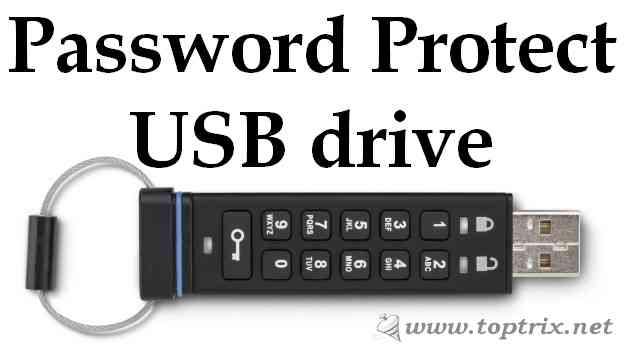 Encrypting the data stored on the pen drive with password protection is the best way to carry sensitive and private information on the USB drive.
Even though you lost your USB drive, you can be sure that the private data do not fall into bad hands.
Encrypting the data stored on the pen drive with password protection is the best way to carry sensitive and private information on the USB drive.Even though you lost your USB drive, you can be sure that the private data do not fall into bad hands.
08 December, 2017
by
Updated on
08 December, 2017
Leave a Comment
Windows 10 Backup & Restore Features Made Easy
Windows 10 'Backup and restore' features have too many options and create confusion. This guide will give you a complete understanding of Windows 10 backup and restore features. This guide will cover Windows 10 file history, Windows restore, Windows refresh and reset, Windows 7 file recovery, Windows drive image and more.
Look at this flow chart. You can easily understand which options available under which category.
Look at this flow chart. You can easily understand which options available under which category.
06 October, 2014
by
Updated on
06 October, 2014
Leave a Comment
Microsoft : The God Of Small Things
I am fan of Microsoft. Not because products, but, I don't have great alternative. Since, Google entered in arena through Web services, Microsoft never catch up with anything. But then late in scene, it jumped with Hotmail / Outlook / SkyDrive / OneDrive / Live ( Live brand is most confusing ever) / Bing / Office online / Office 365 (Still confusing) and similar hard to understand namanclature.
I am trying to completely shift to Microsoft echosystem on web. But everytime I try new product, Microsoft make such a damn errors I cant figureout how to ask for help.
I am trying to completely shift to Microsoft echosystem on web. But everytime I try new product, Microsoft make such a damn errors I cant figureout how to ask for help.
27 September, 2014
by
Updated on
27 September, 2014
6 comments
4 Best Free File Managers For Windows That Can Replace File Explorer
One thing unchanged in a Windows OS is Windows Explorer and there are not many good alternatives. Windows Explorer is the default file manager for all Microsoft Windows OS versions. From Windows 95 to the latest Windows 10, the feature set and interface have not changed much.
Though the Windows Explorer caters to the basic needs, it lacks many features and you feel the cons when you want to manage a large number of files.
Though the Windows Explorer caters to the basic needs, it lacks many features and you feel the cons when you want to manage a large number of files.


