
With the timely change in audience behavior, social media trends also go through prominent changes. This might not be that crucial for regular users, but if you are a business person, social media trends can help you take vital business decisions.
By observing the new social media trends properly, you can follow the steps to make credible social media posts. As a result, new prospects can get easily attracted to your brand page or organizational profile. Furthermore, as you understand the social media trends, you can compete with your competitors in terms of sales enhancement.
Showing posts sorted by date for query facebook. Sort by relevance Show all posts
Showing posts sorted by date for query facebook. Sort by relevance Show all posts
04 March, 2021
by
Updated on
04 March, 2021
Leave a Comment
The 6 Most Important Social Media Trends to Watch for in 2021
14 June, 2020
by
Updated on
14 June, 2020
2 comments
Must Have Free Apps For Android [Update 2020]
Here is the list of apps that you must install for productive use of the mobile.
I have not included the obvious apps like Gmail or social media apps like Twitter and Facebook. Also Google App and similar apps are excluded from the list to keep the list tidy.
Still at first part, there are some apps that are not so common as Gmail so jump to the next section if you already have them.
03 June, 2020
by
Updated on
03 June, 2020
Leave a Comment
Must Have Firefox Extensions [Update 6]
Firefox is a Powerful browser by Birth, add Superpower to it by theses must-have extensions. Apart from extensions, you can install extremely useful Bookmarklets and custom Userscripts in Firefox that also add additional features to the browser.
31 May, 2020
by
Updated on
31 May, 2020
Leave a Comment
Exhaustive List Of Most Useful Chrome Extensions
There are too many extensions to select from. It is very important to choose most useful extension from the Chrome store. Apart from the very obvious extensions, there are many underrated but useful chrome-extensions. And you should not miss them.
Some extensions are so great, you will regret that you never used it before. Here is the list of great Chrome extension that every Pro user should use.
12 September, 2019
by
Updated on
12 September, 2019
Leave a Comment
Most Useful Bookmarklets
Bookmarklets are java-scripts that executes only when you want. Unlike browser extensions, they do not keep running in the background. They are better than extensions all the time. Bookmarklets are universal and same bookmarklet work across all the browsers.
27 August, 2019
by
Updated on
27 August, 2019
Leave a Comment
Account Killer Helps To Delete Your Facebook, Twitter, Instagram And Other 300+ Web Accounts
Do you want to delete an online account? If you care about privacy and security, you should consider to completely delete personal data from online service you are no longer using.
Social media accounts like Twitter, Facebook, Instagram, and many other popular sites collect personal information about the users and store them forever. Even though you delete the account, there is no guarantee that your personal data is completely wiped.
Social media accounts like Twitter, Facebook, Instagram, and many other popular sites collect personal information about the users and store them forever. Even though you delete the account, there is no guarantee that your personal data is completely wiped.
30 July, 2019
by
Updated on
30 July, 2019
Leave a Comment
How To Block A Specific Website On Windows Without Any Software
I know, you want to be productive and don't want to waste your time on browsing Facebook, Twitter or Reddit. But you don't know, how you go there and you waste hours on those social media sites.
Self-control is the only way to use your time for productivity. If you don't want your kids and other family members to open a few specific websites, that is also possible by editing the Windows Host file.
Self-control is the only way to use your time for productivity. If you don't want your kids and other family members to open a few specific websites, that is also possible by editing the Windows Host file.
02 October, 2018
by
Updated on
02 October, 2018
Leave a Comment
How to Delete Your Skype Account
Skype used to be simple, clean and very easy to use, which is precisely what the users needed – and still do. Ever since Microsoft acquired Skype in 2011, it has become complex and confusing, ruining the experience. What’s more, Microsoft recently ended support for the “classic” version of the software.
Skype has lost its competitive edge, as there are many similar services out there, such as Facebook Messenger for daily use, Telegram for safety, and Slack for business. They are much more intuitive than Skype, so people are fully embracing them and increasingly deleting their Skype accounts.
Skype has lost its competitive edge, as there are many similar services out there, such as Facebook Messenger for daily use, Telegram for safety, and Slack for business. They are much more intuitive than Skype, so people are fully embracing them and increasingly deleting their Skype accounts.
17 August, 2018
by
Updated on
17 August, 2018
Leave a Comment
Minimize Facebook Data Collection
Facebook keeps track of everything you do. From the basic things like age, gender, location, relationships, your political views, and every other activity and things you do to the very complex behavioral analytics.
The easiest way to completely avoid Facebook from collecting your personal data is to stop using it and deleting your account. (Not sure that the old data is trashed from the Facebook server).
The easiest way to completely avoid Facebook from collecting your personal data is to stop using it and deleting your account. (Not sure that the old data is trashed from the Facebook server).
Facebook knows more about you than what you think. Conclude things about, how you will behave in specific circumstances.This data is used to target ads and make money. If you can't avoid Facebook, there are few ways you can keep using Facebook and still minimize the data collection.
06 December, 2017
by
Updated on
06 December, 2017
Leave a Comment
How To Pin Important Pinterest Boards At Top On The Profile Page
Pinterest is great platform if you have attractive visuals and graphics. Your profile is most important part of every social media to get attention. Everyone know, that you can pin a post at the top of your profile page on Twitter and Facebook.
27 August, 2016
by
Updated on
27 August, 2016
Leave a Comment
How To Install CyanogenMod On Android One
This guide will help you to flash the CyanogenMod to your Android One mobile. Everything resource like the ROM, custom recovery, gApps and everything else is included.
CyanogenMod have features that are not available with your stock ROM or the AOSP.
CyanogenMod have features that are not available with your stock ROM or the AOSP.
17 April, 2015
by
Updated on
17 April, 2015
22 comments
How To Download Facebook Video On Mobile & PC
Facebook hosts a large number of unique videos that you do not find on YouTube. If you want to download any video on Facebook, you don't need any extra software.
A simple URL trick will allow you to download the Facebook video whether you are using the website on PC or mobile web or even Facebook mobile application.
A simple URL trick will allow you to download the Facebook video whether you are using the website on PC or mobile web or even Facebook mobile application.
11 November, 2014
by
Updated on
11 November, 2014
Leave a Comment
How To Make Facebook More Productive : 6 Features You Must Use
Facebook have too many hidden features that common user do not know. If you use these features, you can make your Facebook experience more productive and interesting. You might be already using some tips, but here are many other features of Facebook you must know that will make you a Facebook power user.

19 October, 2014
by
Updated on
19 October, 2014
Leave a Comment
How To Create Animating Social Media Widget In 5 Minutes
If you want to create social media subscription buttons / widget that load faster, looks good and have mouse hover animation effect, here is a fast way. You can do it within only 5 minutes and that also without any coding knowledge. Other than just good looks, it has SEO advantage. CSS Sprite animation is fast loading and Google loves the fast websites.

19 September, 2014
by
Updated on
19 September, 2014
Leave a Comment
Best Way To Pull Facebook Page Updates In RSS Feed Reader & Why You Should Use
If you don't want to miss any updates from your favourite Facebook page, better you add it to your RSS reader like Feedly. This way you can easily track all the updates without missing anything and also you can save it for later reference, save, clip, forward and more with the IFTTT tool.
The only thing is, you have to do some workaround to pull the updates to RSS reader application. Facebook do not offer the updates via RSS officially. But that is not much difficult to do. Its very easy, do not require any other third party application or service and can be done with all the public Facebook pages.
No need to get notification and visit frequently to Facebook for updates.
The only thing is, you have to do some workaround to pull the updates to RSS reader application. Facebook do not offer the updates via RSS officially. But that is not much difficult to do. Its very easy, do not require any other third party application or service and can be done with all the public Facebook pages.
No need to get notification and visit frequently to Facebook for updates.
16 January, 2014
by
Updated on
16 January, 2014
Leave a Comment
5 Ways To Download / Backup Your Instagram Photos & Videos
Instagram do not provide any way to download or backup your Instagram images. There are may third party web applications as well as software to do download individual or complete backup of Instagram updates. I have tried many of them and here are the best, easiest and free ways to get your photos into your control.
Instagram Downloader
Instarchive
If you want to download photos from your own profile that you have uploaded, this is the best way. Just validate access of the Instarchive to your Instagram account and it's just a matter of few clicks.
You will get the ZIP file for downloading packed with all the images of your own.

Instaport
Instaport is also a simple online service, but with many features. You can download all the images of your own as well as the photos of others that you have liked. You can define the period of the photo upload, like from and to date, last 10 photos, photos with specific tags, or all the photos.
The extra feature is Instaport also allows you to download Videos, though it is still in beta.

Milligram
If you are using Windows 8 computer or tablet, this is a good Instagram client that can along with basic features save the photos. This is not a dedicated photo downloading the application, but you can save the photos individually one by one to local memory. Just select any image in your photostream and tap on the 'save' button.

Pictarine
If you want the Android application to download all your Instagram photos, Pirctarine can do it for you. Pictarine also has a web-based service that you can use on your computer. The Pictarine Android application allows you to view all the photos from various social networks like Facebook, Twitter, Tumblr, Instagram, Flickr, Google Plus, Photobucket, Dropbox, and many other services at one place. You can view, comment, like the photos. It's actually a client for multiple social networks specially designed for photos in mind.

Instarchive
If you want to download photos from your own profile that you have uploaded, this is the best way. Just validate access of the Instarchive to your Instagram account and it's just a matter of few clicks.
You will get the ZIP file for downloading packed with all the images of your own.
Instaport
Instaport is also a simple online service, but with many features. You can download all the images of your own as well as the photos of others that you have liked. You can define the period of the photo upload, like from and to date, last 10 photos, photos with specific tags, or all the photos.
The extra feature is Instaport also allows you to download Videos, though it is still in beta.
Milligram
If you are using Windows 8 computer or tablet, this is a good Instagram client that can along with basic features save the photos. This is not a dedicated photo downloading the application, but you can save the photos individually one by one to local memory. Just select any image in your photostream and tap on the 'save' button.
Pictarine
If you want the Android application to download all your Instagram photos, Pirctarine can do it for you. Pictarine also has a web-based service that you can use on your computer. The Pictarine Android application allows you to view all the photos from various social networks like Facebook, Twitter, Tumblr, Instagram, Flickr, Google Plus, Photobucket, Dropbox, and many other services at one place. You can view, comment, like the photos. It's actually a client for multiple social networks specially designed for photos in mind.
This is a free software for Windows PC. You have to enter the username of the Instagram profile and select the photos that you want to download. You can download photos from any other username also, there is no need to validate the account.

Conclusion: Instaport is the best and easiest way to download your Instagram photos with more options.
Conclusion: Instaport is the best and easiest way to download your Instagram photos with more options.
24 November, 2013
by
Updated on
24 November, 2013
Leave a Comment
Different Approach To Save Battery Of Your Android
If you use Android home button more often than the back button to exit any application for your Android device, you should try out the Greenify application. If you are more cautious about the mobile RAM and battery juice, Greenify will help you in that situation also.
What Greenify do is, it force close the application when you are not actively using them.
Android natively manages the memory very efficiently. When you close the application by any way –either by back button or home button- , some applications keep using the memory and battery resources even though you are not using them at all.
What Greenify do is, it force close the application when you are not actively using them.
Android natively manages the memory very efficiently. When you close the application by any way –either by back button or home button- , some applications keep using the memory and battery resources even though you are not using them at all.
24 April, 2013
by
Updated on
24 April, 2013
2 comments
Listly Is Social Way Of Productive List Creation
No one really wants to join one more social network, still they keep coming. But I am sure List.ly is a completely new and a productive way of creating lists and social integration is a requirement of the idea to make those lists more comprehensive and excellent quality.

22 December, 2012
by
Updated on
22 December, 2012
Leave a Comment
How To Remove Login Credentials Of Websites From Windows 10
Windows 10 save every thing. The password you use to log in to your online accounts are also saved. When you use Microsoft store modern apps like Twitter and facebook for accessing those services, your login information is saved to Windows credential manager.
You can easily delete it if want to.
Go to Control Panel in Windows 8 >> Settings >> Control Panel >> All Control Panel Items >> Credential Manager.
You will find the list of all installed application where you enter user information.
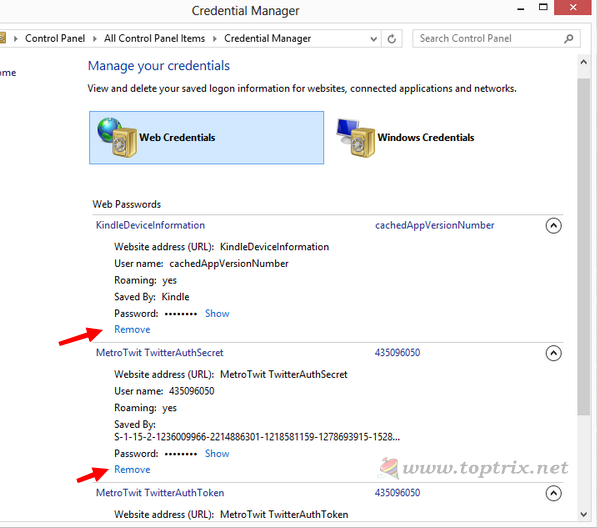
All the passwords are there, now click on the 'Remove' link of the respective application that you have uninstalled or deleted or you can also remove the app that is you are still running
You can easily delete it if want to.
Go to Control Panel in Windows 8 >> Settings >> Control Panel >> All Control Panel Items >> Credential Manager.
You will find the list of all installed application where you enter user information.
All the passwords are there, now click on the 'Remove' link of the respective application that you have uninstalled or deleted or you can also remove the app that is you are still running
22 November, 2012
by
Updated on
22 November, 2012
3 comments
I Wish But I Can't Switch To Google Chrome From Firefox
Years back, Opera was the first web browsers other than Internet Explorer I ever used. The tabbed interface was the 'great' feature for me at that time. Opera introduces me about the fact that I have 'Options' as a browser. I wasted much time in playing with tabs, password remember feature, installed many themes that changed the back, forward and home buttons. It was a great browser for me and then I also find 'Mini' version of it for my Java based mobile. I was really very very happy but then somehow -I don't remember- I came across the darling, Mozilla Firefox.


